
Here is the key confusion: USB-C is a connector shape, while USB 3.0 and Thunderbolt are speed standards. A USB-C port can run at USB 3.0, USB 4, or Thunderbolt speeds depending on the device.
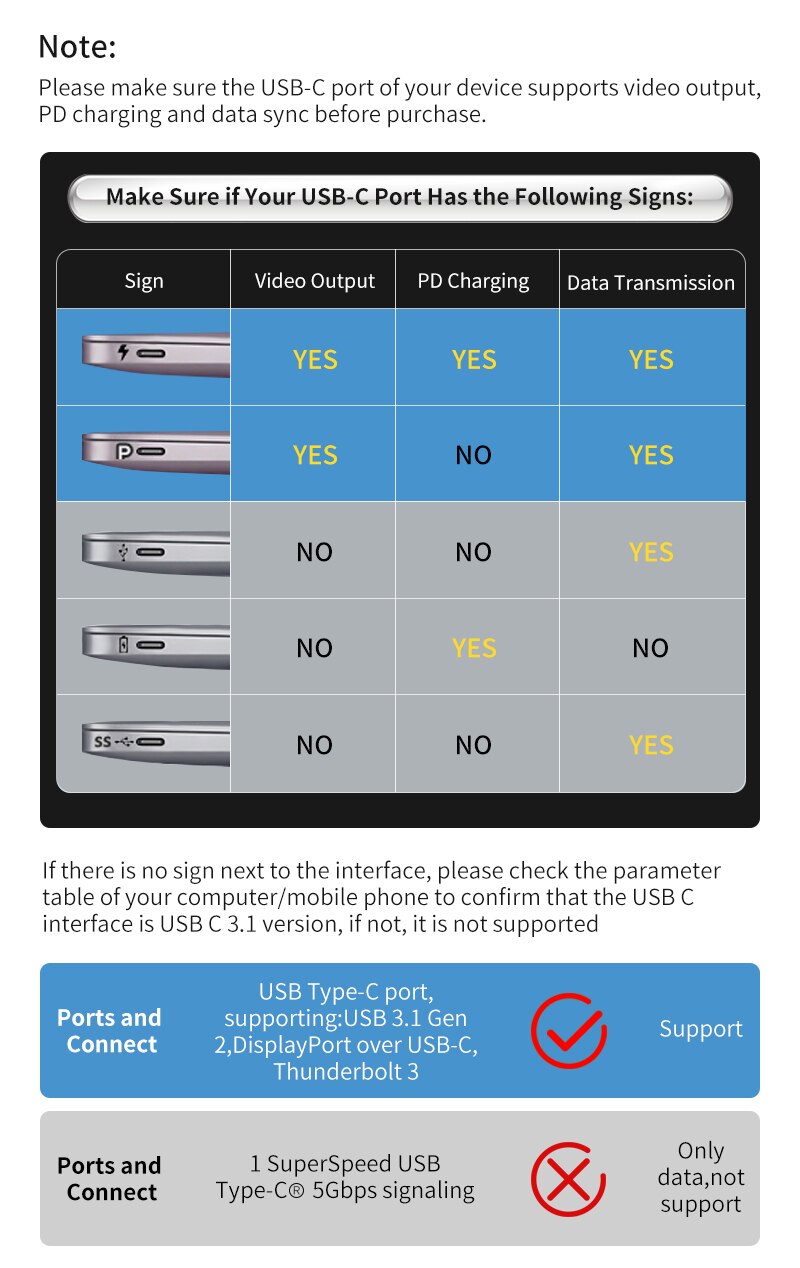
Connector vs standard
- USB-C is the physical oval-shaped plug.
- USB 3.0 / 3.1 / 3.2 are speed versions that can use USB-A or USB-C plugs.
- Thunderbolt 3/4 is a faster standard that always uses the USB-C plug.
Speed comparison
| Standard | Max data speed | Max power | Typical use |
|---|---|---|---|
| USB 3.0 | 5 Gbps | 4.5 W | Drives, basic peripherals |
| USB 3.2 / USB-C | 10–20 Gbps | 100 W | Modern phones, laptops |
| Thunderbolt 4 | 40 Gbps | 100 W | Docks, 4K monitors, fast storage |
Power delivery
USB-C with Power Delivery can carry up to 100W — enough for most laptops. Thunderbolt adds the highest data bandwidth for docks, external GPUs, and high-resolution monitors.
What to look for when buying
- Check the actual standard, not just the connector shape.
- Match the cable to the port (a slow cable bottlenecks a fast port).
- For docks and 4K output, choose Thunderbolt.
Browse our USB hubs and adapters at wholesale prices.
Popular products: Camera Protector Glass for Samsung Galaxy S25 Ultra S25 · Aluminum Shell Usb Port hub vga to type C To Adapter